Showing posts with label Hardware Programming. Show all posts

Tuesday, June 2, 2015

JavaScript's 9 Native Object Constructors

In JavaScript almost everything is object or act like object. Most values (excluding primitive values) involve object being created or instantiated from constructor function. An object returned from the constructor is called an instance. JavaScript uses native constructor to build everything.

JavaScript has nine native constructors to achieve everything in JavaScript programming language. For example functions are objects created from Function() constructor. String(), Boolean() and Number() constructors are not only construct objects but also provide primitive value for string, Boolean, and number.

  • String()
  • Boolean()
  • Number()
  • Object()
  • Function()
  • Array()
  • RegExp()
  • Error()
  • Date()

To remember these 9 native constructors I have created one acronym "SBN OF A RED". This acronym is easy to learn and also in relevant groups.

To create a number variable in JavaScript there are 2 ways:

  1. var iMyNumberPrimitive = 9;
  2. var iMyNumberObject = new Number(9);
First method is to just create primitive value for number, string or Boolean. Second method create complex object with primitive value. You can see below the behavior of such declarations with console:

Same way we can create other type of variables also. It is good practice to use simple primitive variable declaration always if we want normal variables operations, because JavaScript create complex object when you use constructor and will have many other properties associated with variable.

Friday, July 15, 2011

Parallel port programming in Windows XP or Windows Vista

Hello friends, this is very much exciting to control the parallel port, because using parallel port we can control many types of robot from small to very large, there is no limitation we can think beyond the expectation, all the programming can be done on today's fastest computer or laptop and we can place laptop or a CPU in any robot if it is capable of and we can provide vision by camera using vision processing, so lots of ideas can come in picture, here I am giving one simple example that how to control parallel port in windows.

We have two solutions that I know to control parallel port in windows operating system

  1. First method

    Using Turbo C for coding and in a C program include dos.h header file as shown in program below.
  • This program is for blinking a led at all the data pins of parallel port
#include <stdio.h>
#include <conio.h>
#include <dos.h>
#define PORTID 0x378

void main()
{
long int i;
while(1){
   outportb(PORTID,0xFF); //0xFF will enable all the eight data pin of parallel port
   for(i=0;i<999999;i++); // for delay
   outportb(PORTID,ox00); //0x00 will disable all the data pins of port
   for(i=0;i<999999;i++); // for delay
}
}

  • Similarly we can take input from  a parallel port  with the help of inportb(PORTID) function.
  • First declare an integer variable
         For Example:
                             int a;
                             a=inportb(PORTID);
  • Using above statement, status of data pins of parallel port will be stored in variable a, and then we can use this variable for comparison or any other use.
  1. Second method for controlling the parallel port:

  • If you want to integrate your parallel port controlling part in vision processing then you need a good IDE for development like Dev-C++, things those are difficult to implement in Turbo C can be easily done in IDE like Dev-C++. Using inpout32.dll library we can achieve parallel port controlling in Dev-C++
  • I have done this in Dev-C++ while I was using OpenCV2.2 for real time vision processing, it works very well
  • You can download inpout32.dll file
  • Unzip the downloaded folder 
  • Then go to binaries->DLL and copy inpout32.dll file
  • Paste it in 'C:/window/system32/' where all the dll files has been placed
  • After pasting this file now you can use this library in your C program in Dev-C++ IDE
  • Example is shown below:
#include <stdio.h>
#include <conio.h>
#include <windows.h>
#define p 0x378

typedef short _stdcall (*inpfuncPtr)(short portaddr);
typedef void _stdcall (*oupfuncPtr)(short portaddr, short datum);

int main(void)
{
HINSTANCE hLib;
inpfuncPtr in;
oupfuncPtr out;
long int i;
char c;
hLib = LoadLibrary("inpout32.dll");
if (hLib == NULL) {
printf("LoadLibrary Failed.\n");
getch();
return -1;
}
in = (inpfuncPtr) GetProcAddress(hLib, "Inp32");
if (in == NULL) {
printf("GetProcAddress for Inp32 Failed.\n");
getch();
return -1;
}
out = (oupfuncPtr) GetProcAddress(hLib, "Out32");
if (out == NULL) {
printf("GetProcAddress for Oup32 Failed.\n");
getch();
return -1;
}
out(p,0x00);
printf("OFF\n");
while(1){

while(kbhit()){
c=getch();
if(c=='p'){
printf("ON\n");
out(p,0xFF);
}
else if(c=='o'){
printf("OFF\n");

out(p,0x00);
}

}
FreeLibrary(hLib);
out(p,0x00);
return 0;
}

To know how to control Parallel Port in Linux, see my blog: Parallel port programming in Linux

..........Enjoy...:)

Saturday, June 18, 2011

How to control a Motor Using Parallel port.

Parallel port gives a continuos 0 volt(as 0) or continuous 3 volt(as 1).

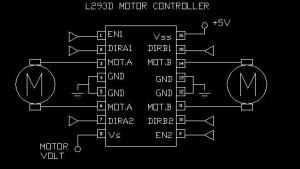
For controlling a motor in both direction, we can use L293D IC which simple to connect and we can controll two motor with the help of one IC, and the maximum current it can provide to motor is 1A. So if we are using motor controlling in a small robot or something else where no much load and motor can be drive by only 1A current then it is the best IC.


This IC takes only four inputs, which can be 0 or 1,and combination of 0, 1 decide how will motor rotate. And parallel port output is sufficient to give the input in this IC. So we can directly add parallel port outputs to the L293D IC inputs, and can control motor in both direction usning programming, and how to control parallel port output using programming i have discussed this in my earlier post.

But in L293D IC there is a problem we can not give more than 1A current for driving the motor so if we want to drive a motor which takes more current we can use L298 IC it can provide about 2A current. But again if you want more than this current then u have to use relay.

relay is much better solution it can switch 220V AC supply also.

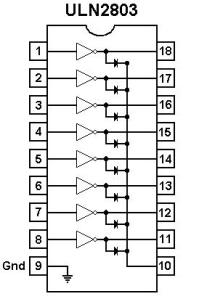
for energizing the realy using parallel port, we can use ULN2803, because parallel port is not able to switch the relay, so it is better option.

Parallel port programming in Linux (Ubuntu)

Hello Every one.

It is very simple to control the parallel port in linux in c. Just run this c program. Make sure you are logged in as a root.
#include <stdio.h>
#include <stdlib.h>
#include <unistd.h>
#include <sys/io.h>
#define pport 0x378

main(int argc,char **argv)
{
unsigned long int i;
if (ioperm(pport,1,1))
    printf("Error: Couldn't get the port at %x\n", pport);

while(1){
 for(i=0;i<99999999;i++);
   outb(0xFF,pport);
   printf("\nON");
 for(i=0;i<99999999;i++);
   outb(0x00,pport);
   printf("OFF");
}
}

This program is for blinking a LED on any data bit of parallel port.

U can change the delay by changing the for loop conditions.

If some one is new to linux then here is some help, how to add root user...

type ' sudo passwd root ' on terminal then hit enter. it will ask password for root user two times, give the password and then login as a root.

enjoy...