Showing posts with label Programming. Show all posts

Sunday, June 14, 2015

JavaScript function as an Object


If you have experience in JavaScript then I am sure you have heard about functions in JS are first class object. In this post I will try my best to explain about functions in JS as an object.

There are many ways to create functions in JS, you can get to know about this in this post: Number of ways to create function

We can add property in any function as we add in any object:

    var MyObj = {}; // creating object
    MyObj.prop1 = "value1"; // Added one property
    console.log(MyObj.prop1); // logs: value1

    // creating function
    function MyFun(arg1, arg2) {
        return arg1 + arg2;
    }

    // adding property in function, and function behave as an object
    MyFun.property1 = "funPropValue1";
    console.log(MyFun.property1); // logs: funPropValue1 
Above code shows that function behave in same way as object while adding new property in function.

Pass function in another function as an argument

In below code a method is passed in function argument, and it executes successfully:
    var MyObj = {};
    MyObj.prop1 = "value1";
    MyObj.logValue = function (value) {
        console.log(value);
    }

    function MyFun(arg1, argFun) {
        var myVal = 1;
        myVal++;
        argFun(myVal);
    }

    MyFun(12, MyObj.logValue); // logs: 2
As we can perform operations similar to object in functions we can say that functions are first class object in JavaScript.

Saturday, June 13, 2015

Number of ways in JavaScript to create functions

Functions in JavaScript are first class object, we can add properties in functions as we add in any object of JavaScript. We can pass function as argument in any function as we pass any object or variable. There are 3 ways we can define function in JavaScript.

  1. Function constructor
  2. Function statement
  3. Function expression

1. Function constructor

Create function using Function constructor as shown below, I am creating one simple function for addition of 2 numbers:
var add= new Function('x','y','return (x+y);');
In this type of function creation, last parameter is the function body. we can pass as many parameters we want. In below example I am passing 3 parameters.
var add= new Function('x','y','z','return (x+y+z);');

2. Function statement

This is the very common or we can say general approach to create function in JavaScript and similar to other programming languages.
function add(a,b){
 return (a+b);
}
This approach is very simple and easy to understand for new developer of JavaScript also.

3. Function expression

In this approach function is declared in a variable, it is like one expression in JavaScript.
var add = function(a,b){
 return (a+b);
};
There is one more variation of this approach which is called named function expression. As you noticed in above function there is no name given after function keyword, but can give name also as shown below:
var add= function addFn(a,b){
 return (a+b);
};
We can give any name after function and both codes (expression and named expression) behavior is same.

Sunday, June 7, 2015

AJAX call in AngularJS for cross domain service using JSONP

It is very easy to set up AJAX call in AngularJS with $http.get(). Similarly in Angular cross domain request is also very easy using JSONP, below code shows how to set up AJAX call for cross domain using $http.jsonp():

(function () {
    var App = angular.module("AngularCrossDomain", []);
    App.controller("AppController", function ($scope, $http) {
        $http.jsonp('<Your Service URL>?callback=JSON_CALLBACK')
            .success(function (data) {
                console.log("pass");
                $scope.value = data; 
            })
            .error(function (data) {
                console.log("failed");
            });
    });
})();

Object Oriented Programmings: Prevent/Allow Inheritance and Prevent/Allow Instantiate

Hello friend,

In this post I am explaining about 4 scenarios which might occur in any real time project or required while implementing an application. Coding is done in C#. but I am sure similar concepts are available in other languages as well like Java.

  1. Implement class which is allowed to inherit and allowed to create instance
  2. Implement class which is allowed to inherit but not allowed to create instance
  3. Implement class which is not allowed to inherit and allowed to create instance
  4. Implement class which is not allowed to inherit and not allowed to create instance

1. Implement class which is allowed to inherit and allowed to create instance

This is the simplest implementation, just create a public class and it will be allowed to inherited and also allowed to create object of this type of class.
    class Class1
    {
        public virtual void Method1()
        {
            Console.WriteLine("In class 1");
        }
    }
    class Class2 : Class1
    {
        public override void Method1() {
            Console.WriteLine("Method1 In class 2");
        }
        public void Method2()
        {
            Console.WriteLine("In class 2");
        }
    }
    class Program
    {
        static void Main(string[] args)
        {
            Class2 c2 = new Class2();
            c2.Method1();   // Print: Method1 in class 2
        }
    }

2. Implement class which is allowed to inherit but not allowed to create instances

To prevent instances of a class is very common feature required for any application. I would like to add one real scenario here in which there is requirement to prevent creating object of class. Suppose we want create one application where we manage employee data for an organization and this organization has 2 types of employee, first Permanent type and second Contract type. There are many properties and behaviors which are common in both type of employees, so we will create one base class to write all the properties and methods. Now if we created this base class with just simple public access modifier, then any one (developer) can create instance of this base class, while conceptually developer should only allow to create object of Permanent employee class or Contract employee class because base employee is not a real employee (there is no existence of only employee in real world, an employee is Permanent employee or Contract employee in this organization1). So to prevent developer creating object of base Employee class, we can use concept of abstract class. Abstract class can not be instantiated, but can be inherited. All the abstract methods of abstract class must be overridden by derived class. Abstract class can also have methods which are not not abstract and full body declaration. If we try to create object of abstract class, compiler will show error as shown below:
We can inherit abstract class easily and implement abstract methods in derived class, as shown below:
abstract class Class1
    {
        public abstract void Method1();
    }
    class Class2 : Class1
    {
        public override void Method1() {
            Console.WriteLine("Abstract method body declaration");
        }
    }
    class Program
    {
        static void Main(string[] args)
        {
            Class1 c1 = new Class2();
            c1.Method1(); // Print: Abstract method body declaration
            Console.Read();
        }
    }
Interface also prevent instantiate, you can not create object of an interface. The interface methods must be overridden while abstract class methods can be overridden.

3. Implement class which is not allowed to inherit and allowed to create instance

C# provide sealed modifier which prevent any class to inherit. You will get error if try to inherit sealed class as shown below:
Below code shows how to use sealed modifier and we can create object of sealed type class easily:
    sealed class Class1
    {
        public void Method1()
        {
            Console.WriteLine("In class1");
        }
    }
    class Class2
    {
        public void Method1()
        {
            Console.WriteLine("In Class2");
        }
    }
    class Program
    {
        static void Main(string[] args)
        {
            Class1 c1 = new Class1();
            c1.Method1();
            Console.Read();
        }
    }
Java provide final modifier to prevent inheritance.

4. Implement class which is not allowed to inherit and not allowed to create instance

To prevent inheritance and instantiate both we can use private constructor of that class. If class constructor access modifier is private then it can not be instantiate as well as inherit from any class as shown below:
Private constructor is used in many application, for example we want to create Utility class and methods of this class should be available directly without creating object of this class, below code shows how to do this:
class Class1
    {
        private Class1()
        {
        }
        public static void Method1()
        {
            Console.Write("class1 static method");
        }
    }
    class Class2
    {
        public void Method1()
        {
            Console.Write("In Class2");
            Class1.Method1();
        }
    }
    class Program
    {
        static void Main(string[] args)
        {
            Class2 c2 = new Class2();
            c2.Method1(); // Print: In Class2 class1 static method
            Console.Read();
        }
    }
Please feel free to give any suggestion if I have written any thing incorrect.


Sunday, May 24, 2015

To Do list App with Angular JS (Learn basic concepts of Angular JS)


Hello All,

Angular JS is really awesome framework created by Google, I learn just basic concepts of Angular JS from codeschool and able to create this application. This small application is a To Do list to keep track of your tasks. I created this for only running session, there is no permanent storage of tasks information.

The HTML code used for Tasks App:
Total Tasks: {{TaskCtrl.taskCounter}} Tasks Pending: {{TaskCtrl.taskPendingCounter}} Tasks Done: {{TaskCtrl.taskDoneCounter}}


Add Task

In Angular JS we can have any number of template file which can be included any where in HTML code using "ng-include" directive of Angular JS, Template file for task "TaskTemplate.html" is as shown below:

{{task.title}}: {{task.description}}
Done?

JavaScript file to create controller for Tasks App is as shown below:

(function () {
    var TaskApp = angular.module("TaskApp", []);
    var Tasks = {
        TasksDetail: [
            {
                id: 1,
                title: "Sample Task 1",
                description: "GO for Aadhar card on Saturday",
                isDone: true
            },
            {
                id: 2,
                title: "Sample Tasks 2",
                description: "Go to shopping in InOrbit on Sunday to buy jeans",
                isDone: false
            }
        ],
        TaskStarted: "Today"
    };

    TaskApp.controller("TaskController", function () {
        this.tasks = Tasks.TasksDetail;
        this.addTask = function (taskTitle, taskDetail) {
            if (!!taskTitle) {
                var task = {
                    id: this.tasks.length + 1,
                    title: taskTitle,
                    description: taskDetail,
                    isDone:false
                }
                this.tasks.push(task);
                this.updateCounter();
                this.taskTitle = "";
                this.taskDesc = "";
            } else {
                alert("Enter title");
            }
        };
        this.removeTask = function (taskId) {
            if (confirm("Task will be deleted..!")) {
                this.tasks.splice(this.getTasksIndex(taskId), 1);
                this.updateCounter();
            }
        };
        this.doneTask = function (taskId,bFlag) {
            this.tasks[this.getTasksIndex(taskId)].isDone = bFlag;
            this.updateCounter();
        };

        this.getTasksIndex = function (taskId) {
            var index = 0;
            for (index = 0; index < this.tasks.length; index++) {
                if (this.tasks[index].id == taskId) {
                    return index;
                }
            }
            return -1;
        };
        this.getTasksCounter = function (isDoneFlag) {
            var counter = 0, index = 0;
            for (index = 0; index < this.tasks.length; index++) {
                if (this.tasks[index].isDone === isDoneFlag) {
                    counter++;
                }
            }
            return counter;
        };
        this.updateCounter = function () {
            this.taskPendingCounter = this.getTasksCounter(false);
            this.taskDoneCounter = this.getTasksCounter(true);
            this.taskCounter = Tasks.TasksDetail.length;
        };
        this.updateCounter();
    });
})();

You can use the app which I have hosted here, you can try to add new tasks, try to complete the taks and delete the tasks:

Style on app is from customized CSS file, you can update CSS properties to update UI/UX. My CSS file is as shown below:

body {
    background-color: #1ec885;
    font-family: 'Lucida Sans', 'Lucida Sans Regular', 'Lucida Grande', 'Lucida Sans Unicode', Geneva, Verdana, sans-serif;
    color: white;
}

#TaskForm {
    color: white;
}

.Box {
    width: 150px;
    height: 20px;
    display: inline-block;
    margin-top: 5px;
}

.InputTextBox {
    width: 100%;
    border-radius: 4px;
}

.InputTextBoxDescription {
    height: 35px;
}

.Button {
    text-align: center;
    cursor: pointer;
}

.ImageButton {
    vertical-align: middle;
}

.AddButton {
    background-color: #ff6a00;
    width: 200px;
    height: 30px;
    padding-top: 10px;
}

.RemoveButton {
    background-color: #961616;
    width: 20px;
    display: inline-block;
    height: 17px;
}

.DoneButton {
    background-color: #ff6a00;
    width: 50px;
}

#TaskFormTable {
    width: 100%;
}

.TaskItem {
    margin: 5px;
}

.TaskTitle {
    font-weight: 900;
}

Monday, December 16, 2013

How to reconfigure JSON length or size in C# / ASP.Net


It is very easy to reconfigure the max JSON size, just we need to include one line code as shown below

JavaScriptSerializer js = new JavaScriptSerializer();
js.MaxJsonLength = int.MaxValue;

Int.MaxValue is 2147483647, which is equivalent to 4 GB, We can simply assign one integer value to JavaScriptSerializer.MaxJsonLength, in above case max value of integer is assigned

There is one more alternative to do this, we can configure the max length in the system.web.extensions configuration section in web.config. The example below sets the maxJsonLength value to 500000 characters


Note: Also keep in mind that the maxJsonLength in the web.config file automatically overrides the JavaScriptSerializer.MaxJsonLength property

Also see post: How to Convert Hexadecimal String to Byte Array in C#

Thursday, July 18, 2013

C Programming Questions and Answers, C Interview Questions, GATE previous year Questions in C Programming

Hello friend, In this post I am going to create a huge collection of all types of Questions with Answers. Wherever I will find any question that is important for GATE or any interview, I will post it here

For programming in C/ C++, you can use Dev C++ IDE, it is free IDE for C and C++ developer, Link to download


Q. What is the difference between the declaration and definition of a variable?

Ans: The definition is the one that actually allocate space, and provides an initialization value, if any. There can be many declaration, but there must be exactly one definition

Q. What is the difference between a statement and a block?

Ans: A statement is single C expression terminated with a semicolon. A block is a series of statements, the group of which is inclosed in curly braces.

Q. How to add two numbers without using arithmetic operators?

OR

Q. Write a function that returns sum of two integers. The function should not use any of the arithmetic operators (+, ++, -, --, .. etc).

Ans: We can not use arithmetic operator but we can use C Bitwise Operators, below is the function that will add two number without using arithmetic operators

int AddNumbers(int x, int y)
{
    if (y == 0)
        return x;
    else
        return AddNumbers( x ^ y, (x & y) << 1);
}

Q. How many squares does a chess-board contain?

Ans: Total number of squares = 8²+7²+...+1² = 204
This concept can be generalized to calculate number of squares in any N*N matrix
1² + 2² + 3² + ....n² = n(n+1)(2n+1)/6

Q. How many rectangles does a chess-board contain?

Ans: Total = [n(n+1)/2]^2
Here n is 8

Wednesday, July 17, 2013

Programming and Data Structure

In this post, I am going to cover all the topics related to GATE and other technical interviews which comes under programming in C and Data Structure.
C is the most basic fundamental language that every CS/IT engineer should know. Also I would say everyone should know at least one computer programming language to understand this fastest growing digital world. Currently we are using many highly technical gadgets those are very user friendly, but one should know after how much effort that product is available to use by a totally non-technical person.
In this post I am going to cover most fundamental concepts of computer science those every Software Engineer should know.

Followings are the important topics related to Programming and Data Structure:

  1. What is C Programming Language
  2. Scope
  3. Binding
  4. Abstract Data Types
  5. Array
  6. Pointer
  7. Stack
  8. Queues
  9. Functions
  10. Recursion
  11. Parameter Passing
  12. Link List
  13. Trees
  14. Binary Search Tree
  15. Binary Heap

What is C Programming Language

C is a programming language developed in 1972 by Dennis Ritchie in Bell Lab. C is reliable, simple, and easy to use. If you know C then you can quickly learn any programming language. No one can directly learn C++ or JAVA, so C is the first step for programming learner. Like a child can not start talking directly without learning words. So in simple language C is the letters and words and Grammar of programming languages.

We can compare C language with any spoken language for example:English

In English language we have:

Alphabets                                   --> Words                                    --> Sentences   -->   Paragraph

Similarly in C language we have

Alphabets, Digits, Special Symbol --> Constants, Variables, Keywords --> Instructions --> Programs

Alphabets similar to English language, digits (0-9), special symbols like (~,!,@,#,$,%,^,&, etc.)

Constants are of two types: Primary constants and Secondary constants

Primary constants are followings:

  • Integer Constants
  • Real Constants (Fractional, exponential)
  • Characters Constants

Secondary constants are followings:

  • Array
  • Pointer
  • Structure
  • Union
  • Enum

Scope

The scope is the context within the program in which an identifier/ variable is valid and can be resolved to find the entity associated to the identifier. A scope in any programming is a region of the program where a defined variable can have its existence and beyond that variable can not be accessed. There are three places where variables can be declared in C programming language.

  1. Inside a function or a block which is called local variables
  2. Outside of all functions which is called global variables
  3. In the definition of function parameters which is called parameters

Local Variables

Local variables are the variables declared inside a function or any block. They can be used only by statements that are inside that function or block of code. They can not be used outside that function or block in which they have been declared. For example in below code var1, var2, var3 are local variables

#include <stdio.h>  
#include <conio.h>
/* declaration of global variable*/
int global_var;

int main(){
    
     /* declaration of local variables  */
    int var1;
    int var2;
    int var3;
    
    /* initialization of local variables */
    var1 = 10;
    var2 = 20;
    var3 = var1 + var2;
    global_var = var3 + 1;
    printf ("Value of var1 = %d, var2 = %d and var3 = %d\n", var1, var2, var3);
    printf ("Global variable global_var = %d\n", global_var);
    system("pause");
    return 0;
}

Global Variables

Global variables are defined outside of a function, usually on top of the program. The global variables will hold their value throughout the lifetime of your program and they can be accessed inside any of the functions defined for the program.

A global variable can be accessed by any function. That is, a global variable is available for use throughout your entire program after its declaration. In above example global_var is a global variable declared on top that can be used in any function.

Function

Function ........

Wednesday, July 3, 2013

Pass XML file in stored procedure as a input parameter from C#


Using xml data type as input parameter of stored procedure, you can store XML documents and fragments in a SQL Server database

Suppose we have XML file as show below:


   Inside First Node
 
 
   Inside Second Node 1
   inside Second Node 2
 
 
   Item 1
   Item 2
   Item 3
 

      We can store above XML file using C# code snippet by passing XML file in a stored procedure as shown below
 static void Main(string[] args)
        {
            string SProc = "dbo.usp_XMLParser";
            string ConnectonString = @"Data Source=JITENDRAPAL\SQLEXPRESS;Initial Catalog=JPDB;Integrated Security=True;";
            XmlDocument xmldoc = new XmlDocument();
            xmldoc.Load(@"my.xml");
            using (SqlConnection sqlConnection = new SqlConnection(ConnectonString))
            {
                sqlConnection.Open();

                using (SqlCommand sqlCommand = new SqlCommand(SProc, sqlConnection))
                {
                    sqlCommand.CommandType = CommandType.StoredProcedure;
                    sqlCommand.Parameters.Add(
                          new SqlParameter("@XMLFile", SqlDbType.Xml)
                          {
                              Value = new SqlXml(new XmlTextReader(xmldoc.InnerXml, XmlNodeType.Document, null))
                          });
                    using (DataTable dataTable = new DataTable())
                    {
                        dataTable.Locale = CultureInfo.InvariantCulture;
                        using (SqlDataAdapter sqlDataAdapter = new SqlDataAdapter())
                        {
                            sqlDataAdapter.SelectCommand = sqlCommand;
                            sqlDataAdapter.Fill(dataTable);
                        }
                        Console.WriteLine(dataTable.Rows[0]["Col1"].ToString());
                        Console.Read();
                    }
                }
            }

            Console.Read();
        }
In above code:
a.     My.xml is xml file as shown in point 1
b.     We can load xml file using XMLDocument Load method as shown below
 XmlDocument xmldoc = new XmlDocument();
 xmldoc.Load(@"my.xml");
c.     Pass xml file using SQLParameter to the stored procedure as shown below
 sqlCommand.Parameters.Add(
                          new SqlParameter("@XMLFile", SqlDbType.Xml)
                          {
                              Value = new SqlXml(new XmlTextReader(xmldoc.InnerXml, XmlNodeType.Document, null))
                          });

Stored procedure ‘usp_XMLParser’ takes XML file as input and store XML file in SQL table

SQL Script of stored procedure is as shown below:

 USE [JPDB]
GO
SET ANSI_NULLS ON
GO
SET QUOTED_IDENTIFIER ON
GO

ALTER PROCEDURE [dbo].[usp_XMLParser] @XMLFile XML
AS
BEGIN
DECLARE @hdoc [int]
DECLARE @ID [int]
DECLARE @Key [varchar](1000)
DECLARE @NumberOfKeys [int]
DECLARE @Counter [int] = 0;
DECLARE @Value [varchar](2000);

IF EXISTS (SELECT * FROM sys.objects WHERE object_id = OBJECT_ID(N'[dbo].[XMLDataTable]') AND TYPE IN (N'U'))
                   BEGIN
                             DROP TABLE [dbo].[XMLDataTable]
                   END
                   -- Creating table
                   CREATE TABLE [dbo].[XMLDataTable](
            [ID] [int]
                       ,[Key] [varchar](1000)
                             ,[Value] [varchar](2000)
                   )

SET @NumberOfKeys= (SELECT COUNT([Key]) FROM [JPDB].[dbo].[XMLKeysTable]);

EXEC sp_xml_preparedocument @hdoc OUTPUT, @XMLFile

 WHILE(@Counter < @NumberOfKeys)
 BEGIN
   SELECT @ID= [ID], @Key = [Key] FROM [JPDB].[dbo].[XMLKeysTable] ORDER BY [Key] OFFSET @Counter ROWS FETCH NEXT 1 ROWS ONLY
   SELECT @Value = Value FROM OPENXML (@hdoc, @Key,1) WITH (Value [varchar](1000) 'text()[1]')
   INSERT INTO [dbo].[XMLDataTable]
   VALUES(@ID, @Key, @Value)
   SET @Counter += 1;
  END

--Removes the internal representation of the XML document specified by the document handle and invalidates the document handle
EXEC sp_xml_removedocument @hdoc

SELECT 'true' AS [Col1] 
END
·         Above stored procedure takes XML file as input using XML type input parameter
@XMLFile XML

I am storing XML file in table ‘dbo.XMLDataTable’

To know more about XML parsing in T-SQL and explanation of above stored procedure refer my next post ‘XML Parser in SQL Server

Saturday, March 3, 2012

My M.Tech Thesis @ IIIT Allahabad

SMART: Social Mobile Advance Robot Testbed

We envision that in near future, Humanoid Robots will enter in the household. They have capability to change the quality of life and advance the human civilizations further. For this thing to happen, humanoid robot researchers need to solve many challenging problems. Towards this we have taken a significant step in developing indigenously a low cost research test bed where researchers can develop and test many technologies for Human Robot interactions. The basic issue which has been addressed is the development of a cost effective platform which will be stable and robust, having an open architecture so that various technologies like speech, vision, intelligence can be integrated with physical gestures. First we have described the developmental architecture of the SMART, and then the application of SMART as an intelligent robot which, for the time being, is capable of demonstrating our robotics and artificial intelligence laboratory to the visitors as a lab guide in an interactive manner.

Below is the SMART in Greeting position


Developed By--
Jitendra Kumar Pal
M.Tech(robotics) IIITA
Jainendra Shukla
M.Tech(robotics) IIITA

Published Paper:
1. SMART - http://www.springerlink.com/content/n23171m677645j05/
2. CLOUD Robotics - http://www.springerlink.com/content/t686230uh2728763/
First paper is published on SMART (Social Mobile Advanced Robot Testbed) Robot, which contains detail description of architecture of SMART, total degree of freedom, algorithm used for real time navigation and algorithm used in real time obstacle detection and avoidance. 
  • SMART navigating autonomously in Robotics Lab of IIITA
  • SMART guiding audience autonomously in Lab with my professor G.C. Nandi

  • Detail of implementation of speech in SMART
    • For Speech of Robot we have used an online application TTS
    • This online TTS application convert text to speech (English)
    • Pronunciation of this application is very good, and it was meeting our requirement, so we have used this application
  • Below is real time demo given by SMART in Robotics Lab at IIITA


  • Below is real time demo by SMART and showing inner structure of SMART (Working of hand's motors)


  • SMART, inspecting by our professor G.C.Nandi


  • Manual control of SMART in early stage of develpoing by me [JP], SMART has two modes
    • One is Autonomous mode in which it will act as a guide to greet any visitor and give demonstration of Robotics lab to the visitor autonomously
    • Second mode is manual mode in which it can be controlled manually by human using system interface. SMART can be controlled by keyboard 


  • Very early stage of SMART development (Only Base): below is the demonstration of SMART when we have developed it's base, which contain only two geared motor for navigation. We have used car wiper motors which suites very well for our requirement


  • SMART with new professional look (Complete Development): Below is the demonstration given by SMART in autonomous mode, this time cloths of SMART is provided by our very kind Sir Dr. Pavan Chakraborty


  •  Other small projects developed during M.Tech
    • We have developed this robot for participating in IIT Kanpur techfest Techkriti 2012 in the event Lumos, and we have won 2nd prize. Below Robot Video shown is an autonomous robot which is able to avoid obstacle(in this case black color) so it will move only on the white color. We are using OpenCV for processing the Image in real time.


    • Below is small robot capturing ball from the range of its vision, this is bird view arena so range is fixed. Camera is on the top which is fixed so robot has limited area to search for an object and capture it. This small concept can be implemented in many large industry where pic and place of heavy objects is required, without human intervention Robots can do his job autonomously. Video shown below is an autonomous robot which is able to capture a ball any where in its limited environment. Controlling of actuators has been done using parallelport and  We are using OpenCV for processing the Image. It can capture the ball and will drop the ball on the defined check point.


Thursday, March 1, 2012

Programming with OpenCV best link (OpenCV Tutorials).

To learn the structure and concept of Open CV you can use this link.

Wednesday, February 29, 2012

Configure GSL-1.8 with Dev-C++ in windows.

To download gsl-1.8 you can use this link.

The GNU Scientific Library (GSL) is a numerical library for C and C++ programmers. It is free software under the GNU General Public License.

The library provides a wide range of mathematical routines such as random number generators, special functions and least-squares fitting. There are over 1000 functions in total with an extensive test suite.

The complete range of subject areas covered by the library includes,

Complex NumbersRoots of Polynomials
Special FunctionsVectors and Matrices
PermutationsSorting
BLAS SupportLinear Algebra
EigensystemsFast Fourier Transforms
QuadratureRandom Numbers
Quasi-Random SequencesRandom Distributions
StatisticsHistograms
N-TuplesMonte Carlo Integration
Simulated AnnealingDifferential Equations
InterpolationNumerical Differentiation
Chebyshev ApproximationSeries Acceleration
Discrete Hankel TransformsRoot-Finding
MinimizationLeast-Squares Fitting
Physical ConstantsIEEE Floating-Point
Discrete Wavelet TransformsBasis splines

  • You can download gsl-1.8 form here.
  • After downloading install gsl.
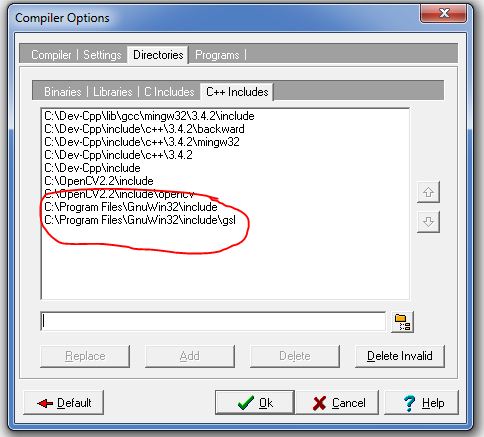
  • and do some changes in the Dev-C++ compiler.
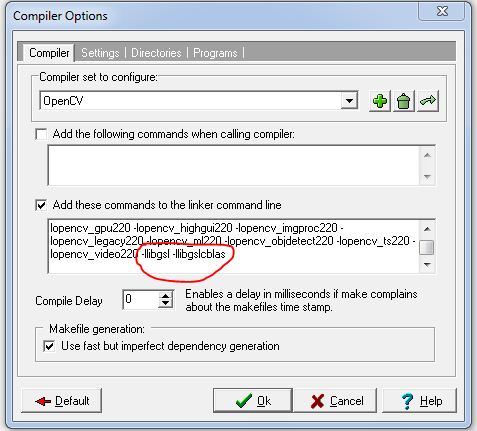
  • go to Tools->Compiler options then follow these steps as shown in image below.
  • add these commend to the linker
    • -llibgsl -llibgslcblas


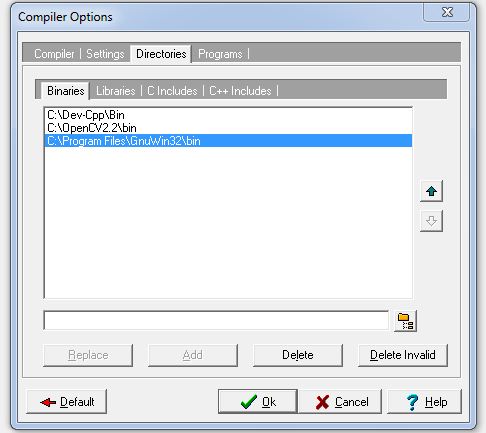
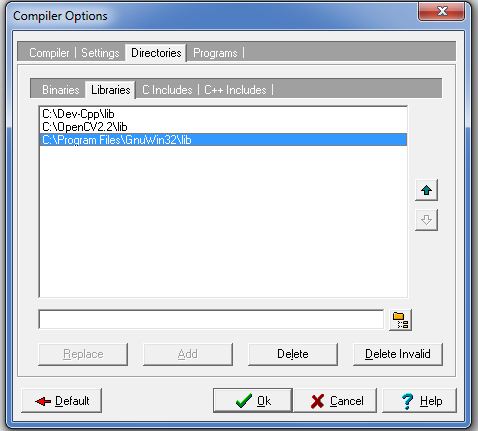
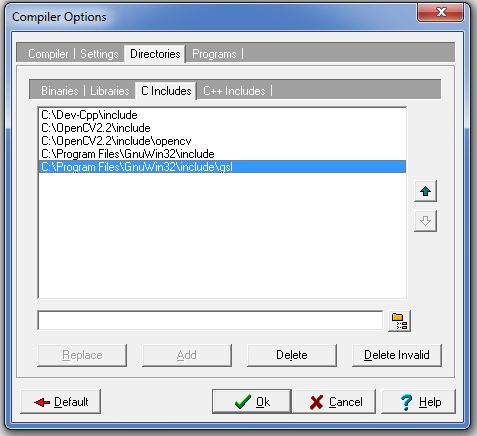
  •  Then go to directories and add followings directories of GSL as shown below


Wednesday, February 22, 2012

Hardisk data recovery tool for all windows operating system.

If accidentally you have deleted some files in your system, or at the time of installation you have deleted some partition of your hard disk, then you can use this tool for recovering your files.

http://www.cgsecurity.org/testdisk-6.13.win.zip


After downloading this software, first extract it where you you want to recover all your data, then run photorec_win.exe (In the extracted folder). then select the hard disk or some partition from that you want to recover your data.

It will work in

-Windows NT 4
- Windows 2000
- Windows XP
- Windows 2003
- Windows Vista
- Windows Server 2008
- Windows 7

ENJOY...

Best sites for learning.

This is the best site for learning the Genetic algorithm. It also has some applet for better understanding.

http://www.obitko.com/tutorials/genetic-algorithms/


Website for learning many technical things with videos.

http://nptel.iitk.ac.in/

http://nptel.iitm.ac.in/

http://www.khanacademy.org/


Monday, July 25, 2011

Configure OpenCV2.2 with Dev-C++ in windows.

In the earlier post i have configured the opencv2.1 with dev-c++ now opencv2.2 is there and it has many more library including all the library in previous vrsion opencv2.1. So it will be good to use OpenCV2.2.

For configuring the opencv2.2 with dev-c++, first you have to install opencv2.2.

You can download OpenCV2.2 from here.

After downloading install OpenCV2.2

and do some changes in the Dev-C++ compiler.

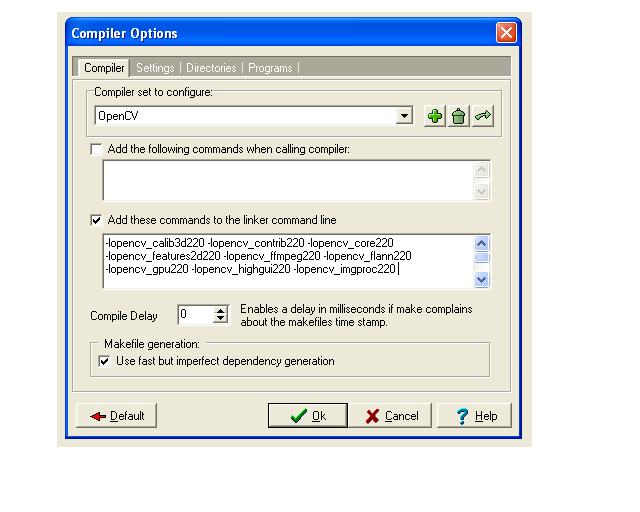
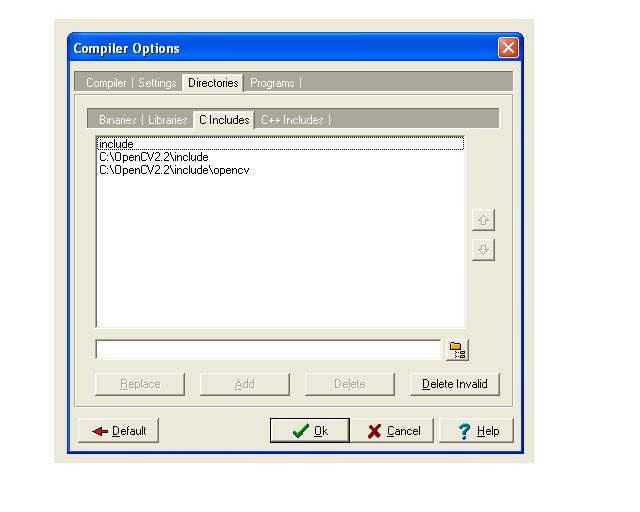
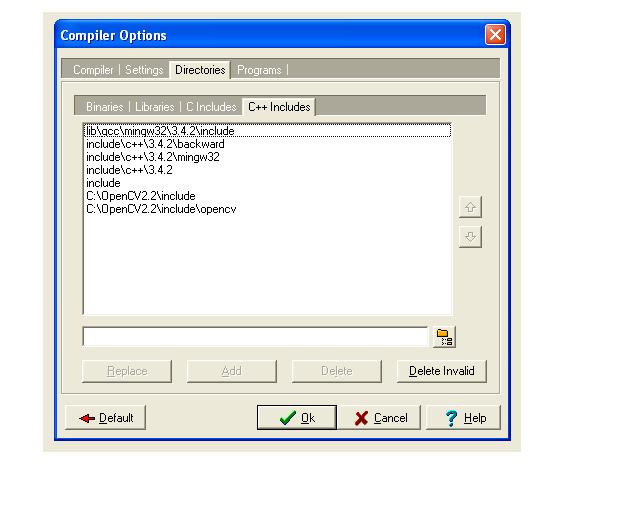
go to Tools->Compiler options then follow these steps as shown in image below.


In this image all the linker text is not visible so just copy this:

-lopencv_calib3d220 -lopencv_contrib220 -lopencv_core220 -lopencv_features2d220 -lopencv_ffmpeg220 -lopencv_flann220 -lopencv_gpu220 -lopencv_highgui220 -lopencv_imgproc220 -lopencv_legacy220 -lopencv_ml220 -lopencv_objdetect220 -lopencv_ts220 -lopencv_video220

and click ok.

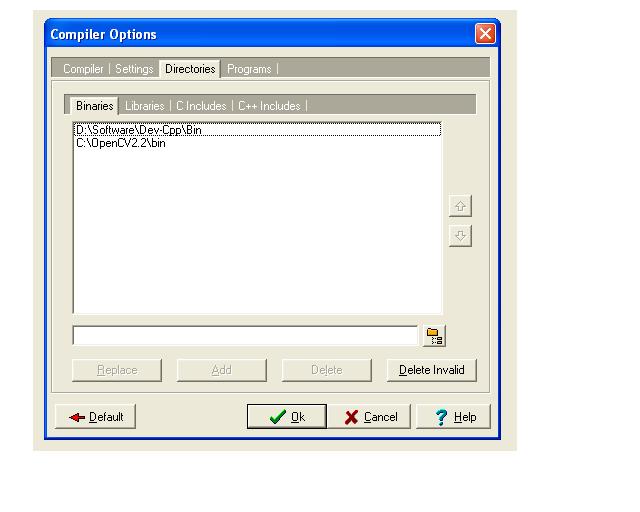
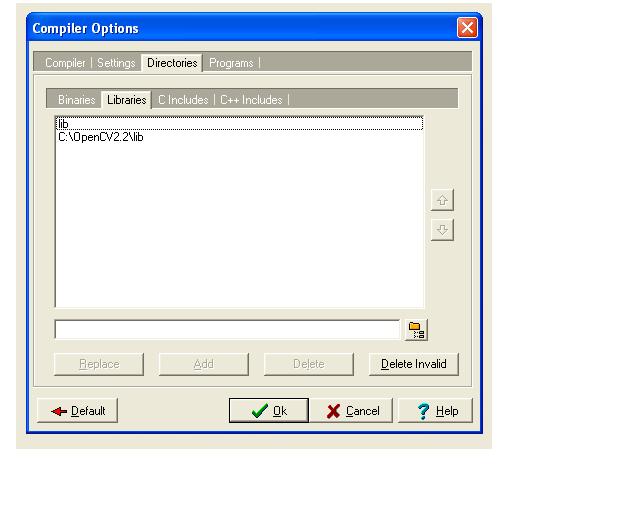
Now goto directories and add some directories of OpenCV2.2.


A simple example for capture an image from camera


#include 
#include 
#include 
#include 
int main(int argc,char *argv[])
{
IplImage *frame=0,*grayimg=0;
CvCapture* video=0;
video = cvCreateCameraCapture(1);
if(!video)
{
printf("\nCamera Initialization Failed.............");
}
cvNamedWindow("Display",CV_WINDOW_AUTOSIZE);

while(1)
{
frame=cvQueryFrame(video);
if(!frame) break;
cvSaveImage("image.jpg",frame);
cvShowImage("Display",frame);
char ch=cvWaitKey(30);
if(ch==27) break;
cvReleaseImage(&frame);
}
cvReleaseCapture(&video);
cvDestroyWindow("Display");
getch();
return 0;
} 

Friday, July 1, 2011

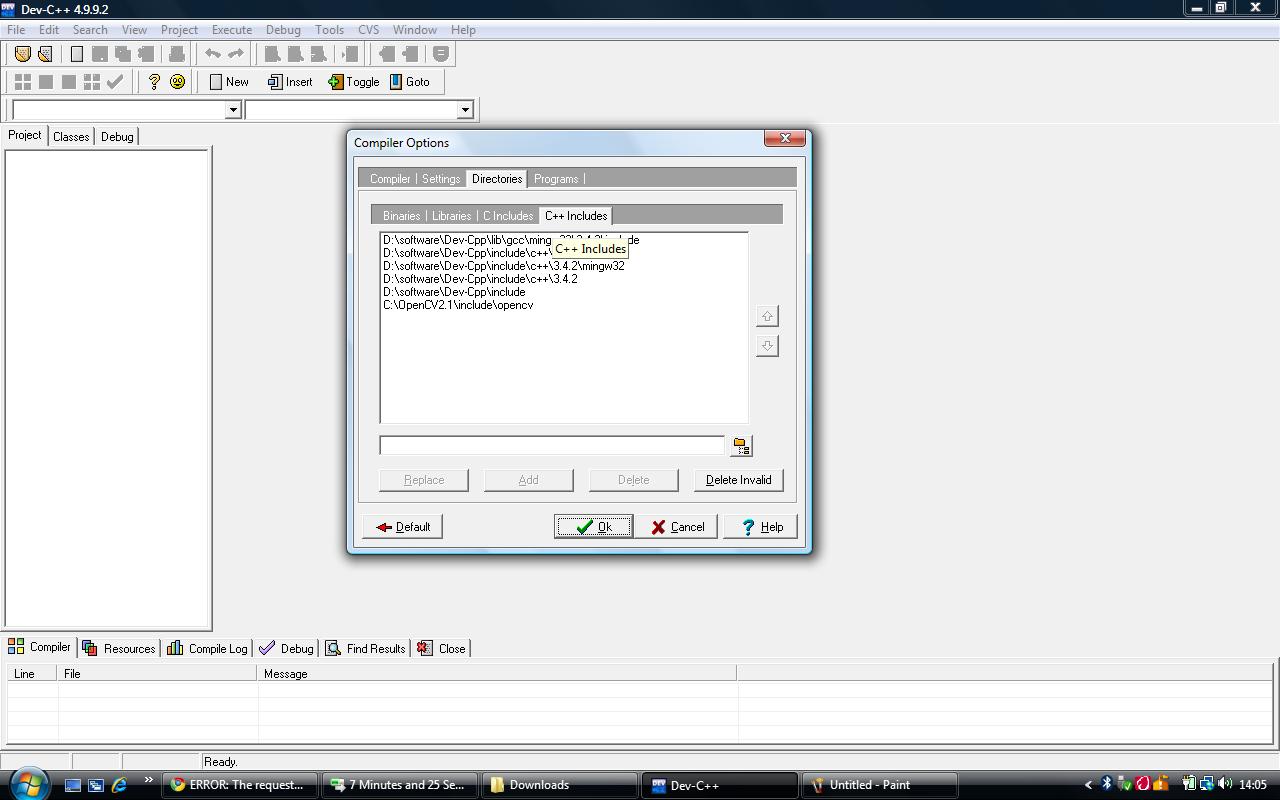
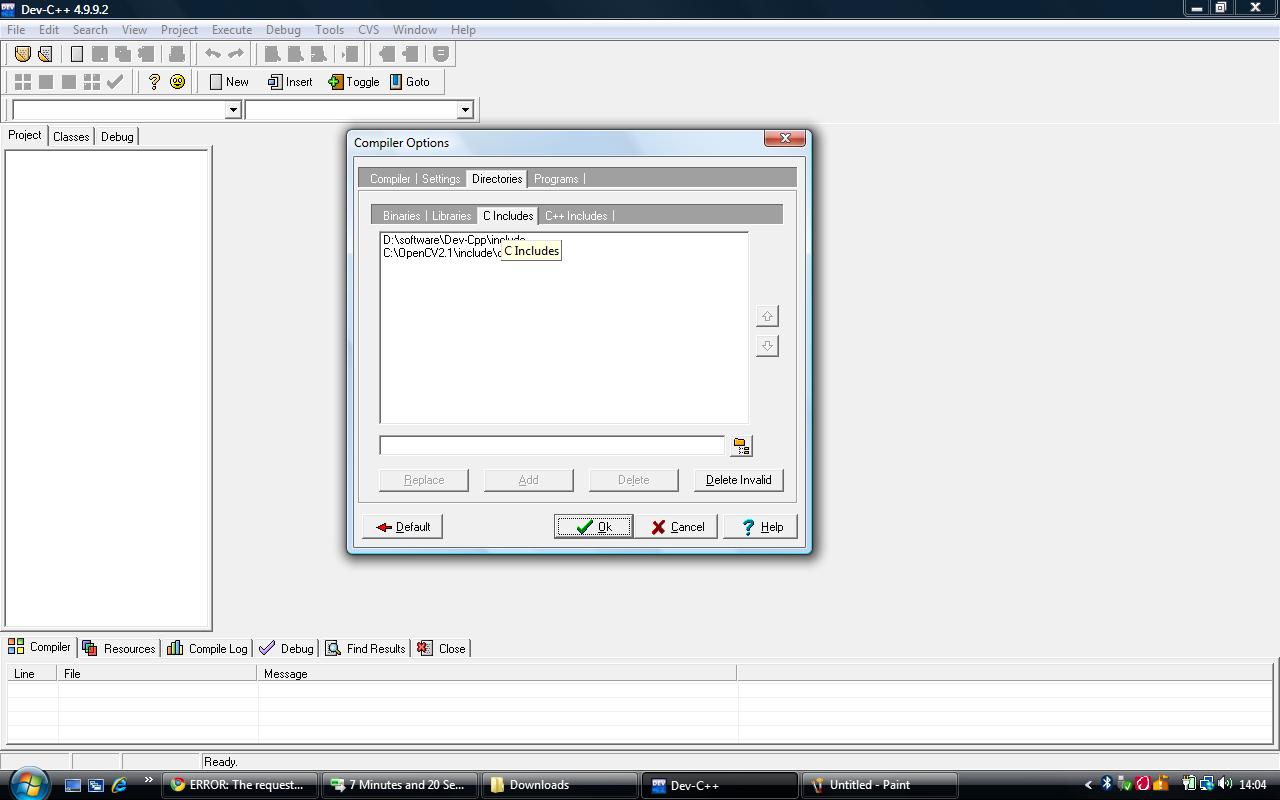
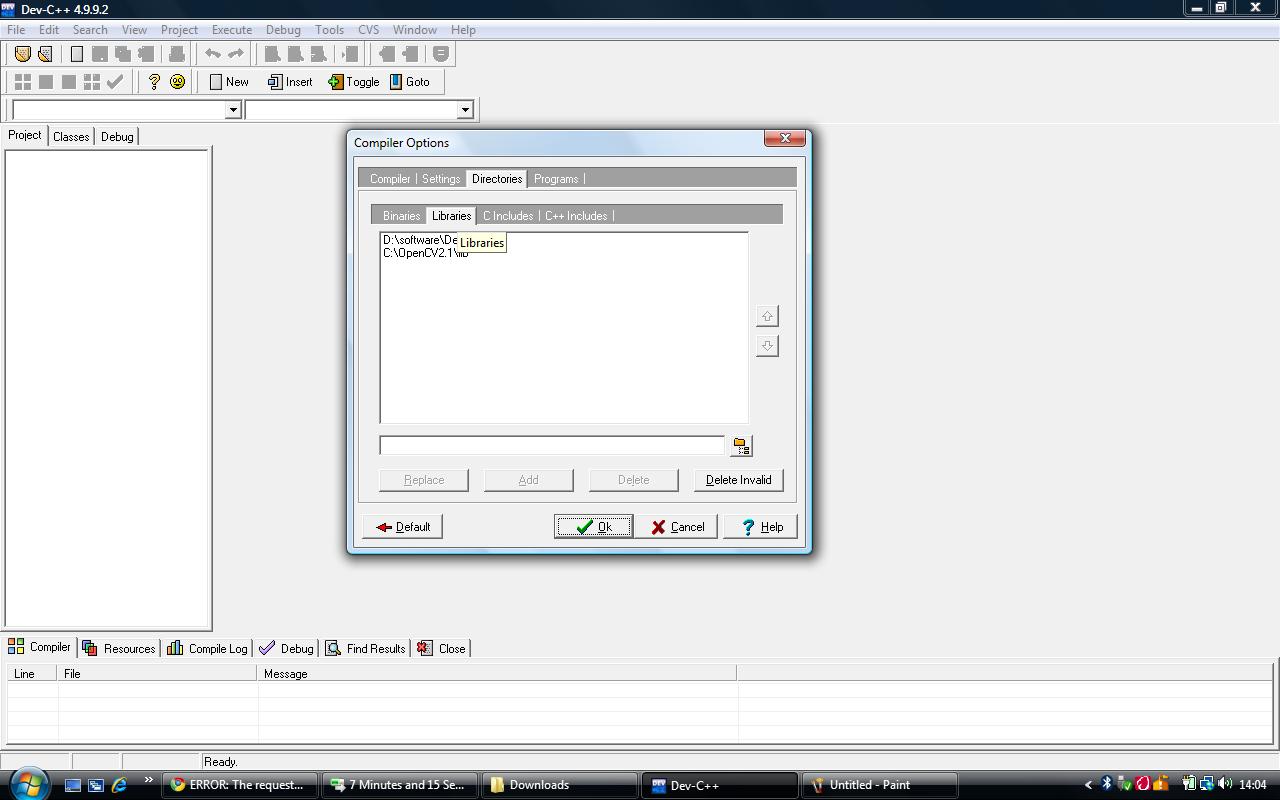
Configure OpenCV2.1 with Dev-C++

download OpenCV2.1 form this link, install it in C drive.

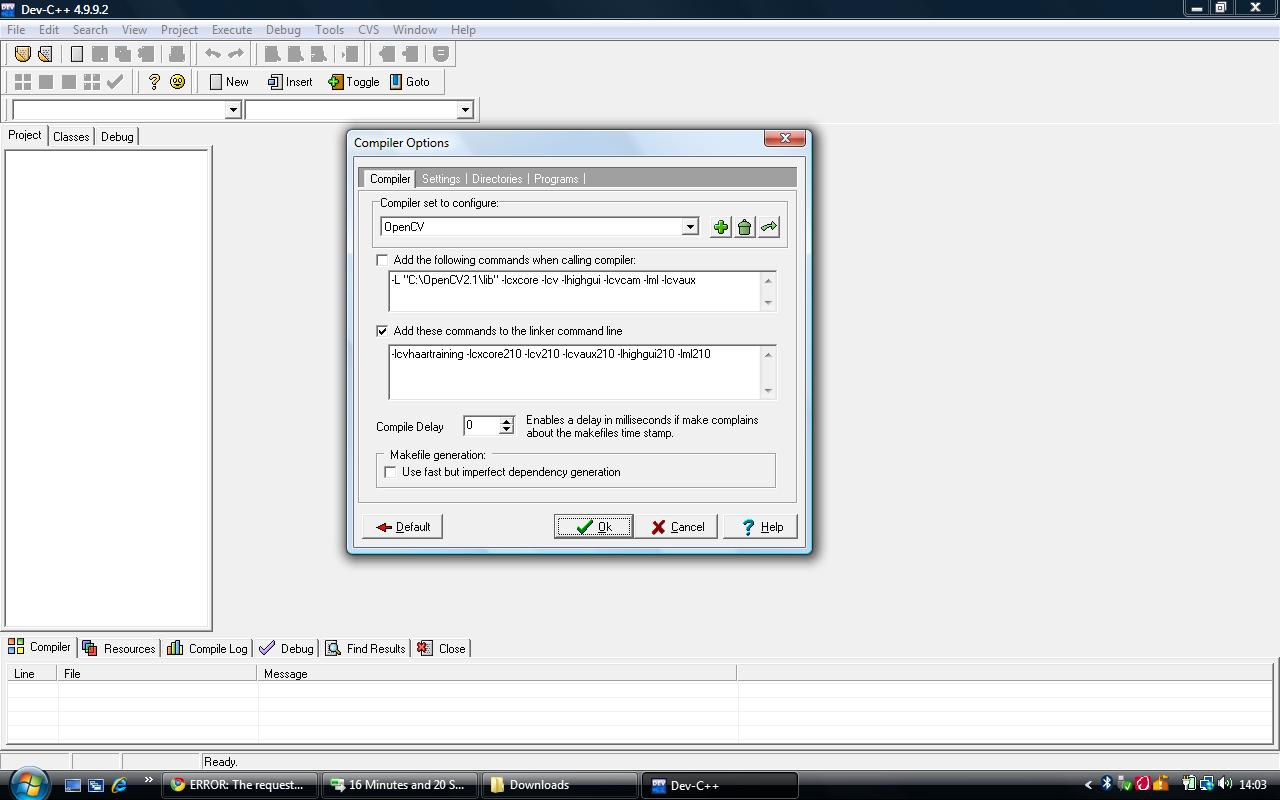
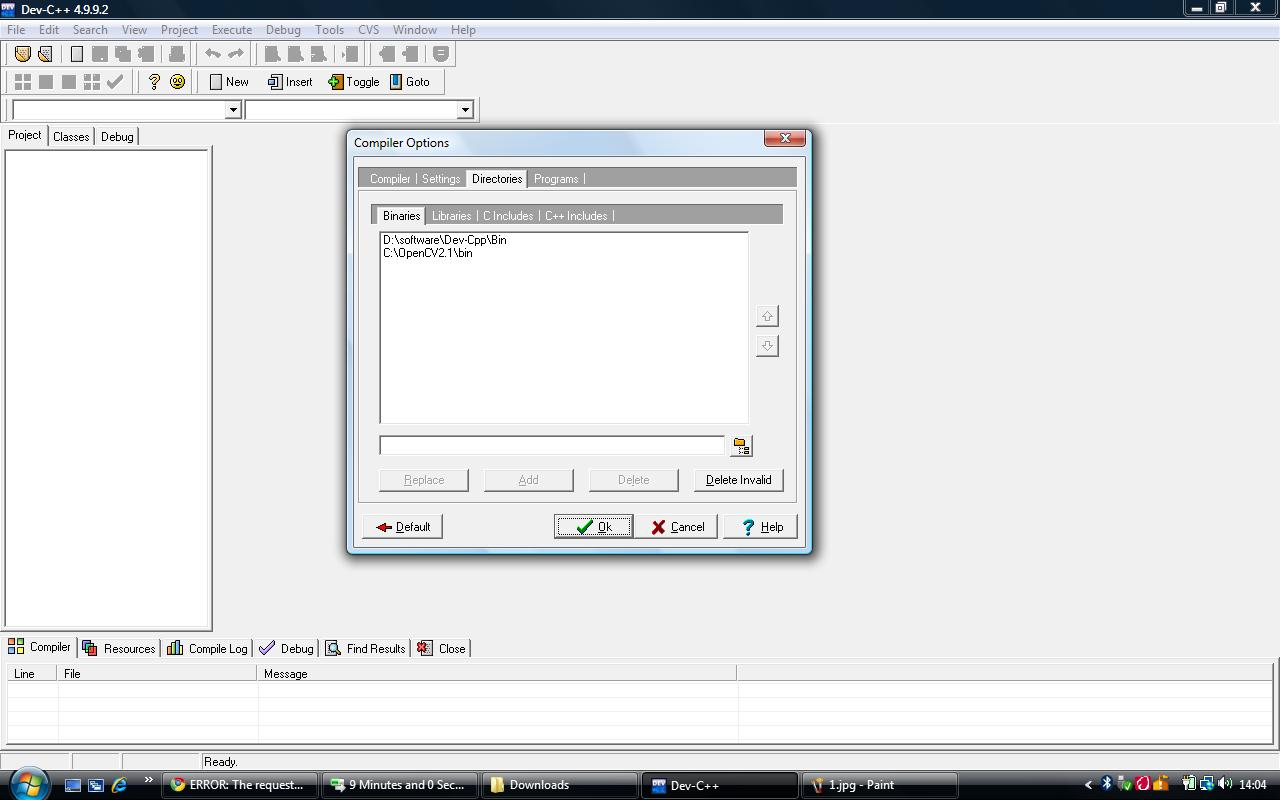
now open dev-cpp and open compiler options from tool menu, and link the files as shown in figure.

Click on image to see inlarge..


Wednesday, June 29, 2011

bootable usb for window or How to install window 7 using USB

hi all it is very simple to do that..

First download this file.

install it.

Make an ISO file of window 7 DVD.

And make sure u have a pen drive of minimum 4GB.

after that run the Windows7-USB-DVD-tool, which you have downloaded and installed, from your desktop icon and follow the steps.

it will take some time.

after completing this. make USB 1st priority for booting in BIOS then restart

it will work enjoy....