Showing posts with label JavaScript. Show all posts

Tuesday, December 7, 2021

Debouncing and Throttling in JavaScript

Hi, Debouncing and Throttling concepts are little bit hard and confusing for anyone who is trying to understand first time. Some time I get confused with the logics that which one called debounce and which logic called throttling.

So here I am trying to write few things so that we can remeber it always. Followings are few real life examples of debouncing:

  • When we press a electronic button, like TV remote button, there are chances that it gets pressed multiple time in micro/mili seconds, but there is debouncing logic there so that multiple times button pressinga are ignored for those micro/mili seconds, so input gets considered only for once, other signals get bounced
  • One more real life example I would like mention. If you have ever used or seen hand dryer in some place, it uses debounce. Let me explain, when you place your hand in it then it starts running, now if you get your hand out for few seconds, it still runs and if you place your hand in that again then it continues running. So what is happening here, hand dryer has a sensor which check if your hand is in the dryer or not in few seconds(suppose 3 seconds). When you take out your hand from dryer it wait for 3 seconds to switch it off. If you place your hand again say after 2 seconds then action to switch off is canceled. So whenever you take out hand hand action for close is registered and it will get closed if not detect hand for 3 seconds. Suppose if we have done the programming for this in JS then it would be like this:

    Placing image for reference

    First basic version will be like below where no debouncing is used:

          // method to switch off dryer
          switchOff(){ 
         	// ....some code
          }
          // method to switch on dryer
          switchOn(){
          	// ....some code
          }
          
          addEventListener("handOn", switchOn);
          
          addEventListener("handOff", switchOff);


    In this scenario it will be very jerky in switching on and off when user's will use dryer as we move our hands during drying. Now let's see how we can improve this?

          var timerId;
          // method to switch off dryer
          switchOff(){ 
         	// .... some code
          }
          // method to switch on dryer
          switchOn(){
          	// .... some code
          }
          
          addEventListener("handOn", function(){
          	clearTimeout(timerId);
            switchOn();
           );
          
          addEventListener("handOff", function(){
            clearTimeout(timerId);
          	timerId = setTimeout(function(){
    	        switchOff(); 
            }, 3000);
          });
        

    In the above code we are clearing the previuos action if it occurs before 3 seconds, that is called debouncing

  • One more example I would like to mention here, suppose there is one child and he is demanding cake from his mom. Now mom do not want to give the cake whenever he demand, but mom said if you keep quiet for 30 mins then you will get the cake. So if child is quiet for 30 mins atleast then mom give him a cake, but he makes noise in between then counter is again reset. So this is also a debounce condition for giving the cake if child make noise

Throttling

One example of throttling by which you can understand it:

Imagine yourself as a 7-year-old toddler who loves to eat chocolate cake! Today your mom has made one, but it's not for you, it's for the guests! You, being spunky, keep on asking her for the cake. Finally, she gives you the cake. But, you keep on asking her for more. Annoyed, she agrees to give you more cake with a condition that you can have the cake only after an hour. Still, you keep on asking her for the cake, but now she ignores you. Finally, after an interval of one hour, you get more cake. If you ask for more, you will get it only after an hour, no matter how many times you ask her.
This is what throttling is!


Thursday, September 15, 2016

Why call and apply two methods available in JavaScript

I hope everyone know about what is call and apply. Just for reminder,

The call() method calls a function with a given this value and arguments provided individually

 myFunction.call(thisArg[, arg1[, arg2[, ...]]])

The apply() method calls a function with a given this value and arguments provided as an array

 myFunction.apply(thisArg, [argsArray])

So both call and apply do similar job as to change the scope of function in which it gets executed (change this of function). So why exactly JavaScript has these 2 methods, one to pass array as an argument and another as the comma separated args. As per my experience in JavaScript I found few places where actually we can use apply but not call. May be you got some other examples also then please share. I would like to take one example here. Suppose we need to find out the min in a given array of integer (unsorted), what will be your approach? First approach we can think to search and find min or sort the array and find min. But if the question is, you have 5 numbers and find out the min of these 5 numbers, now can you think to use Math library (Math.min) in this case and find out min

 // we can pass individual numbers comma separated in Math.min and find out min easily
 Math.min(4,1,8,3,7) // 1

Now think about using array here.......??? can we pass array in this Math.min ? ..... Yes we can !

 var ar = [4,1,8,3,7];
 Math.min.apply(undefined, ar) // 1

Now suppose if only call is available in javascript we can not achieve this using call

In ES6 there is one more way to achieve this. Spread/rest parameter

 var ar = [4,1,8,3,7];
 Math.min(...ar) // 1
Know more about spread/rest parameter

Saturday, August 27, 2016

Align Element in Center

Align element in centre position of the screen using only CSS

Horizontal alignment is very easy on the screen. But some times alignment in vertical is very difficult

Horizontal alignment

To align an element horizontally best approach is using margin

 margin: 0 auto;

Vertical alignment

To align an element vertically we can use this approach

  transform: translateY(-50%);
  position: relative;
  top: 50vh; 

There is one another approach to center it using CSS3 flex property

 // on the parent element we just need to apply flex properties
  height: some height;
  display: flex;
  justify-content: center;
  align-items: center;
You can check on codepen: Codepen

If you have any other approach please share.

Wednesday, August 24, 2016

Block level scoping in JavaScript

Block level scoping in JavaScript

If you are familiar with JavaScript. If you are working as FE developer then must be aware that JavaScript has functional level scoping not block level scoping as in C family languages.

Now, from ES6 JavaScript introduces let keyword. "var" keyword is still there which will function in same manner as it is currently. Using let keyword you can declare one variable inside one block and its scope will be in that block only as block level scoping in C family languages.

For example
// using var only
function myFun(){
 var a=1;
 if(a>0){
  var b=2;
 }
 console.log(b);
}

myFun(); // 2

// using let keyword
function myFun2(){
 var a=1;
 if(a>0){
  let b=2;
 }
 console.log(b);
}

myFun2(); // Uncaught ReferenceError: b is not defined

In above example second function myFun2 gives error as let has block level scoping only and it is declared inside if block so it is not available out side if block.


Saturday, August 6, 2016

Clone/Copy JavaScript Object

Creating an Object copy from an object was not easy earlier in JavaScript (before ECMAScript 2015). Now as ECMA 2015 is available we can use Object.assign to create copy of an object.

Create clone/copy of an object before ECMAScript 2015

 var obj1 = {a:1,b:2}, obj2;
 // one simple way is to stringify and then use
 obj2 = JSON.parse(JSON.stringify(obj1));
 console.log(obj2); // {a:1,b:2} 

Clone/Copy after ECMAScript 2015

Now ECMAScript 2015 provided assign method in Object so that we can create clone/copy of an object. For method is available chrome 45 onwards.

 var obj1 = {a:1,b:2}, obj2;
 obj2 = Object.assign({}, obj1);
 console.log(obj2); // {a:1,b:2}
 
 // another way to use same method (assign)
 var obj3={x:1, y:2}, obj4 = {};
 Object.assign(obj4,obj3);
 console.log(obj4);

Sunday, June 26, 2016

Input Validation with Styling anywhere in your site

Hello Friend, When we have input fields in our websites then many custom styling we apply or required for form validation. For example if user entered something, if user changed the value of input, is input empty. Many more depend on user actions.

Here I created one small utility which you can add in your site code and all the inputs of your project can be validated using this, without adding any extra code. Below is the code which you need to add in JavaScript.

function inputValidator(inputSelector) {
  var current_val = $(inputSelector).val();
  function onChange() {
    $(this).removeClass("dirty").addClass("pristine");
    this.updated_val = $(this).val();
    if (this.updated_val != current_val) {
      $(this).removeClass("pristine").addClass("dirty");
    }
  }
  function onFocus(){
    $(this).removeClass("untouched").addClass("touched");
  }
  $(inputSelector).on("input change", onChange);
  $(inputSelector).on("focus", onFocus);
  return true;
}

$(document).ready(function() {
  $.each($("input"), function(key, value) {
    new inputValidator(value);
  });
});

When you add above code in your javascript, then all input will have one class "untouched" by default. Class of input will change on user action, and you can apply style on input based on classes.

  • By default class is untouched
  • When you touch the input, class will change to "touched"
  • When you enter something in the input, class will change to "touched dirty"
  • When you revert you changes in the input, class will be "touched pristine"

For example, if our inputs are as shown below:

Text:

Email:

Password:

Number:

Date:

CSS code that I have written for inputs:

.name{
  display: inline-block;
  width:80px;
}
input.untouched{
  background-color: #DDF4FC;
}
input.touched{
  background-color: #6AFAFA;
}
input.touched.pristine{
  background-color: #43FF44;
}
input.touched.dirty{
  background-color: #FF4422;
}

Now if user interact with inputs, colors changes as mentioned in css style

Here is the codepen link : http://codepen.io/JitendraPal/pen/MebLoX

Thursday, May 19, 2016

Spread operator or Rest parameter or Ellipsis in JavaScript (ES6)

Spread/Rest/Ellipsis operator in JavaScript is very useful in many context. First important use of this operator is to pass indefinite number of argument in function

Operator syntax: ...name

Three dot and then a variable name

 function sum(a,b,...n){
  return a+b+n[0]+n[1];
 }
 sum(1,2,3,4); // output: 10 

This is also called rest parameter. inside function it can be used directly as array.

As we already know that arguments is already available in function to get many parameters as shown below: but actually that is not array

function fun(){
 return arguments[0] + arguments[1];
}

fun(1,2); // 3


function fun2(...n){
 console.log(arguments);
 console.log(n);
}

fun2(1,2,3); // it will print arguments object and array n.

There are other advantages of spread operator. Suppose we have 2 arrays and need to merge both

var a = [1,2,3], b = [4,5,6];
a.push(...b);
console.log(a); // [1,2,3,4,5,6]

Sunday, April 24, 2016

AngularJS advanced trick and techniques

These days AngularJS is highly recommended framework for front-end developer. Angular is really awesome framework to work with. Below are few techniques those I feel really cool features and may be these are simple and easy for you but as a fresher in angular I think these features are really good.

1. How to add multiple classes in ng-class?

Everyone knows how to add class using ng-class, its very easy. We can use ng-class to have more than one class as well

 
// single class
// multiple class
some content

Similarly we can add many classes separated by comma (,)

2. Can we have multiple conditions in ng-hide and ng-show?

Yes, we can have multiple conditions in ng-hide and ng-show.

// ng-show with multiple conditions
Some content

3. How to share methods or data between controllers?

Yes we can share data and methods between controllers using Factory or Service. Angular has service as constructor method which instantiate once on startup and we can use this service/factory in any controller within the module by injecting on controller method.

Restrict input to allow only required value (jQuery plugin for input type validation)

HTML5 provides many validation on input, but still few we need to implement by our self. For example, if we need one input for price then we should allow users to enter only float values. I created one small plugin using jQuery, it is very easy to use.

To create one input with only price value then just include attribute "only-price"


To create one input with only number (contact) value then just include attribute "only-number"


Here is the codepen: http://codepen.io/JitendraPal/pen/JXBqXj

Friday, February 12, 2016

How to use factory or service in AngularJS

As a beginner in AngularJS it is very important to understand Service/Factory. AngularJS provides many services itself and we can use those services whenever we required, just by injecting in controller/module.

when we need to share some functions or some data we can create our own service/factory and have all the methods/data in that. To use these service's method or data we just need to inject that service and use.

For example if we want to share one data object in 2 different controller, say controller1 and controller2. We Create one service dataService

 var app = angular.module("app",[]);
 app.factory('dataService',['$http', function($http){
  var dataService = {};
  dataService.method1 = function(){
    console.log("method1 executing");
  };
  dataService.method2 = function(){
    console.log("method2 executing");
  };
  return dataService;
 }]);
 

Now we can use this service in any controller by injecting

app.controller('controller1',['dataService','$scope' function(dataService,$scope){
 dataService.method1();  // it will print 'method1 executing'
 dataService.method2();  // it will print 'method2 executing'
}]);
app.controller('controller2',['dataService','$scope' function(dataService,$scope){
 dataService.method1();  // it will print 'method1 executing'
 dataService.method2();  // it will print 'method2 executing'
}]);

In same way we can create service also instead of factory, the only difference between factory and service is that, service is constructor function while in factory we need to return the object. For same objective we can create service as follows:

 app.service('dataService',['$http', function($http){
  this.method1 = function(){
    console.log("method1 executing");
  };
  this.method2 = function(){
    console.log("method2 executing");
  };
 }]);

Thursday, October 1, 2015

how to align elements in a row with equal space around

Hello friend,
For any front-end developer aligning elements in a row with equal space is very common problem. This problem can be solved very easily if site is non responsive. But it will little difficult if your site is responsive. One method to solve this problem is use some calculation with margin/padding to properly align elements with spaces in between. Or one solution can be write huge media query for spaces in all different window widths. For example to create menu bar and keep it align horizontally for all small devices as well.

CSS3 provides one very good feature to solve such problems easily, that is- display: flex

Consider below code to display divs with text class as headers link
 
Item1
Item2
Item3
Item4
Item5

Apply this CSS code to display headers properly in all window widths

#container{
    display:flex;
    justify-content: space-around;
}
.delimeter{
    border-left:1px solid red;
}
Result of this code will be as:
You can check this link to see the example: https://jsfiddle.net/JitendraPal/6fdLpLxd/

To work properly in all browsers use prefixed appropriately as shown below:

          display: flex;
          display: -moz-flex;
          display: -ms-flex;
          display: -webkit-flex;
          justify-content: space-around;
          -ms-justify-content: space-around;
          -webkit-justify-content: space-around;
          -moz-justify-content: space-around;

Sunday, August 30, 2015

JavaScript amazing facts

JavaScript is the most used language of this time on the planet earth.

  1. Everything is object in JavaScript, even function is also a first class object.
    • You can pass function object as an argument to a function
    • Function object can be returned from a function
    • Function may assigned to a variable
    • Function May be stored in an object or array
  2. JavaScript programs use Unicode character set (UTF-16) which is super-set of ASCII and Latin-1 and supports virtually every written language currently used on the planet
  3. NULL is an object in JavaScript
  4. NaN is a number, if we say typeof NaN, then it would be number
  5. typeof Infinity is a number
  6. Function can execute themselves. We call them self executing function. This is very important concept/feature which is used at many places
  7. using typeof we can not get if any variable is of type array. So how we can determine if a variable is of type array?
    var ar = [1,2,3];
    ar instanceof Array // this will return true because ar is of type array
    
    There is one more way to get the type of any variable:
    var ar = [1,2,3];
    Object.prototype.toString.call(ar); // "[object Array]"
    

Thursday, July 9, 2015

One good way to declare Global Variables in JavaScript

In JavaScript, declaring one variable as global is very easy, some one can say that if you just write a=3; "a" will be global, and if you write var a=3; then a is local (It is not at all true..!).

Let me explain first scope in JavaScript, JavaScript is functional level scoping language (not block level as C family languages) and any variable declared inside a function is not available to outer function (parent function).

Any variable directly declared or initialized outside (not inside any function) will be global variable

        var myVar = 3; // global variable 
        function myFun(){
            var funVar = 33; // this variable is not global, scope of this variable is within "myFun" function
        }
    
Below image explain it better on console, window is the root object in a browser, so if we declare any variable outside then it comes directly under window object:

In above snapshot window.funVar is undefined because this variable is not available globally because it is inside function "myFun".

Main aim of this post is to find out best way to keep all the global variables if required in an application. One question will come in mind that, why we should avoid global variables in an application??

Normally in an application there are many JS files and if any 2 or more files have same variable name and those are global then application will be messed up and it will really hard to find the issue sometime. So we should always avoid using global variables.

Before ECMA Script 5 strict mode, there were no way to check that inside function we have declared global variable by mistake. But now using "use strict" we can find out such issues.

We can create a class to have all the global variables inside that, and using getter nd setter method we can easily get and set the variables.

// how to use Global variables in JS
    var GlobalVariables = function () {
        // keep all the variables in this GlobalVars object
        var GlobalVars = {
            var1: 123,
            var2: 456,
            var3: "values"
        }
        this.get = function (name) {
            return GlobalVars[name];
        };
        this.set = function (name, value) {
            GlobalVars[name] = value;
        };
    };

    // craeate an object to fetch all the varibales and you can set also using get and set methods
    var global = new GlobalVariables();
Usage of above global object is as shown in console below:

Wednesday, July 1, 2015

Advanced JavaScript Questions

Hello Friend,

I am sharing few questions which are most important in JavaScript. These are advanced concepts in JavaScript. You can refer my previous posts to go through them thoroughly.

  1. Hoisting concept
  2. OOPs in JavaScript
    1. Prototypal and classical model
    2. Inheritance
    3. Polymorphism
    4. Encapsulation (modeling)
  3. Closure
  4. What is prototype
  5. What is __proto__
  6. What is new in JavaScript
  7. What is bubbling
  8. Will the methods added later in prototype available in the object which is created earlier
  9. What is constructor in function prototype
  10. Scoping in JavaScript (function level vs block level)
  11. What is this
  12. How function work as constructor
  13. In how many ways we can declare functions
  14. Can you create a function which will add n numbers (n is not fixed)
  15. Number of way we can call the functions in JavaScript
  16. What is JSONP
  17. What is CORS
  18. Does inner function get access to the outer function "this"? If not how we can use "this" object inside inner function
  19. Why we use JQuery reference from CDN
  20. Is JavaScript multi-threaded or single threaded?
  21. How setTimeOut works in JavaScript? What is setInterval?
  22. What is Event Loop in JavaScript?
  23. How to create clone of a object?
  24. How to compare 2 objects are same or not?
  25. How to Swap 2 elements of an array by using Array functions available in JavaScript
  26. What is the difference between document.ready and window.load?
  27. How to check if one variable is of type Array?
  28. How can you empty an array in JavaScript? What will happen if you use arr.length = 0 ?
  29. Explain complete rendering of a page. Suppose you hit www.google.com, explain all the process step by step.
  30. How to remove one property from an Object in JavaScript
  31. What is instanceof operator in JavaScript?
  32. What are Function, Method, and Constructor in JavaScript? How to implements these in JavaScript?
  33. What is self invoking function in JavaScript and what is the use of it?
  34. What are the design pattern in JavaScript?
  35. What is singleton pattern? How we can achieve singleton pattern in JavaScript?
  36. In how many way you can create object in JavaScript?
  37. What is Publisher Subscriber architecture in JavaScript? How we can implement this?
  38. How to flatten an object in JavaScript?
  39. How to un-flatten object in JavaScript?
  40. How to prevent object modification in JavaScript? What is the difference between seal and freeze
  41. What is strict mode ("use strict") in JavaScript?
  42. Write a function to merge 2 objects dynamically in JavaScript.

Answers for all the above questions will be posted soon...


Monday, June 22, 2015

Closures in JavaScript

Closure in JavaScript are most confusing term, but actually it is most powerful concept of JavaScript. Closure occurs in JavaScript because of functional level scoping. Function inside function can use members of outer function (parent function).

I would like to write 2 most important

  1. The context of an inner function includes the scope of the outer function.
  2. An inner function enjoy that context even after the parent functions have returned.

Let’s discuss one problem scenario, suppose we have one button on the page and now we need how many times button is clicked, we need the count. One simple way of implementation is: use one global variable and increment that variable on button click. This is easy but Global variables are not good to use, because same variable name might be present in the application. It is never recommended to use global variable in JavaScript. One good solution to this is to use functional level scoping of JavaScript and create Closure. Closure in JavaScript are caused due to function level scoping.

Below is one example of closure which is used to get one incremented number every time.

    var getCount = (function () {
        var counter = 0; // parent function variable which is accessible in child function
        return function () {
            return ++counter;
        };
    })(); // self executing function 

The output of this function when called will be as shown below:

Saturday, June 20, 2015

Private functions and variables in JavaScript..!

Private function or properties we know very well in programming language like Java, C#. Is it possible to achieve this in JavaScript? Yes..!

If you want to know more about Object oriented concepts in JavaScript then please first go through this post: OOPs in JS

In JavaScript Functions are so powerful to build OOPs and modular concepts. Following concepts are implemented using Function only in JavaScript:

  1. Method
  2. Class
  3. Constructor
  4. Module

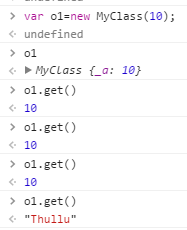
Below code shows the code which create class MyClass and it has private members:

    function MyClass(a) {
        var count = 3; // private member

        // this check function is private function
        function check() {
            if (count > 0) {
                count--;
                return true;                
            }
            else {
                return false;
            }
        }
        this._a = a;
        this.get = function () {
            if (check()) { // use of private function
                return this._a;
            }
            else {
                return "Thullu"; // after invoking get method 3 times in the object this else will be executed
            }
        }
    }

In the above code variable, count is private as any object created from MyClass will not have this variable similarly function check() is private function as this function is not part of this in the MyClass. When we create an object of MyClass using new keyword this is returned. This concept is possible in JavaScript because of lexical scoping (functional scoping).

When we create object of this class MyClass, and call the get method more than 3 times:

I would like to write few points regarding new keyword.

  1. When a function is called with the new operator, a new object is created with prototype members and assigned to this.
  2. Above statement is true only if there is no explicit return value in the function. If explicit return is present in Class (function), then same return will be assigned to the object.

I would like to give here one more example with very basic functionality like in all OOP languages we have. We declare private field and then use public properties to expose the private field, in more formal and OOPs way we create Get and Set method to update private field or retrieve private member of class.

Same get and set functionality for private variables in JavaScript we can achieve as shown in below example:

 // private class with get and set methods
    function MyClass() {
        var _privateField = 0; // It is private field as it is not part of "this"
        this.GetPrivateField = function () {
            return _privateField;
        };
        this.SetPrivateField = function (value) {
            _privateField = value;
        };
    }
Following is the console output using above MyClass object:

Sunday, June 14, 2015

JavaScript function as an Object


If you have experience in JavaScript then I am sure you have heard about functions in JS are first class object. In this post I will try my best to explain about functions in JS as an object.

There are many ways to create functions in JS, you can get to know about this in this post: Number of ways to create function

We can add property in any function as we add in any object:

    var MyObj = {}; // creating object
    MyObj.prop1 = "value1"; // Added one property
    console.log(MyObj.prop1); // logs: value1

    // creating function
    function MyFun(arg1, arg2) {
        return arg1 + arg2;
    }

    // adding property in function, and function behave as an object
    MyFun.property1 = "funPropValue1";
    console.log(MyFun.property1); // logs: funPropValue1 
Above code shows that function behave in same way as object while adding new property in function.

Pass function in another function as an argument

In below code a method is passed in function argument, and it executes successfully:
    var MyObj = {};
    MyObj.prop1 = "value1";
    MyObj.logValue = function (value) {
        console.log(value);
    }

    function MyFun(arg1, argFun) {
        var myVal = 1;
        myVal++;
        argFun(myVal);
    }

    MyFun(12, MyObj.logValue); // logs: 2
As we can perform operations similar to object in functions we can say that functions are first class object in JavaScript.

Saturday, June 13, 2015

Number of ways in JavaScript to create functions

Functions in JavaScript are first class object, we can add properties in functions as we add in any object of JavaScript. We can pass function as argument in any function as we pass any object or variable. There are 3 ways we can define function in JavaScript.

  1. Function constructor
  2. Function statement
  3. Function expression

1. Function constructor

Create function using Function constructor as shown below, I am creating one simple function for addition of 2 numbers:
var add= new Function('x','y','return (x+y);');
In this type of function creation, last parameter is the function body. we can pass as many parameters we want. In below example I am passing 3 parameters.
var add= new Function('x','y','z','return (x+y+z);');

2. Function statement

This is the very common or we can say general approach to create function in JavaScript and similar to other programming languages.
function add(a,b){
 return (a+b);
}
This approach is very simple and easy to understand for new developer of JavaScript also.

3. Function expression

In this approach function is declared in a variable, it is like one expression in JavaScript.
var add = function(a,b){
 return (a+b);
};
There is one more variation of this approach which is called named function expression. As you noticed in above function there is no name given after function keyword, but can give name also as shown below:
var add= function addFn(a,b){
 return (a+b);
};
We can give any name after function and both codes (expression and named expression) behavior is same.

Sunday, June 7, 2015

AJAX call in AngularJS for cross domain service using JSONP

It is very easy to set up AJAX call in AngularJS with $http.get(). Similarly in Angular cross domain request is also very easy using JSONP, below code shows how to set up AJAX call for cross domain using $http.jsonp():

(function () {
    var App = angular.module("AngularCrossDomain", []);
    App.controller("AppController", function ($scope, $http) {
        $http.jsonp('<Your Service URL>?callback=JSON_CALLBACK')
            .success(function (data) {
                console.log("pass");
                $scope.value = data; 
            })
            .error(function (data) {
                console.log("failed");
            });
    });
})();

Tuesday, June 2, 2015

JavaScript's 9 Native Object Constructors

In JavaScript almost everything is object or act like object. Most values (excluding primitive values) involve object being created or instantiated from constructor function. An object returned from the constructor is called an instance. JavaScript uses native constructor to build everything.

JavaScript has nine native constructors to achieve everything in JavaScript programming language. For example functions are objects created from Function() constructor. String(), Boolean() and Number() constructors are not only construct objects but also provide primitive value for string, Boolean, and number.

  • String()
  • Boolean()
  • Number()
  • Object()
  • Function()
  • Array()
  • RegExp()
  • Error()
  • Date()

To remember these 9 native constructors I have created one acronym "SBN OF A RED". This acronym is easy to learn and also in relevant groups.

To create a number variable in JavaScript there are 2 ways:

  1. var iMyNumberPrimitive = 9;
  2. var iMyNumberObject = new Number(9);
First method is to just create primitive value for number, string or Boolean. Second method create complex object with primitive value. You can see below the behavior of such declarations with console:

Same way we can create other type of variables also. It is good practice to use simple primitive variable declaration always if we want normal variables operations, because JavaScript create complex object when you use constructor and will have many other properties associated with variable.