SMART: Social Mobile Advance Robot Testbed
We envision that in near future, Humanoid Robots will enter in the household. They have capability to change the quality of life and advance the human civilizations further. For this thing to happen, humanoid robot researchers need to solve many challenging problems. Towards this we have taken a significant step in developing indigenously a low cost research test bed where researchers can develop and test many technologies for Human Robot interactions. The basic issue which has been addressed is the development of a cost effective platform which will be stable and robust, having an open architecture so that various technologies like speech, vision, intelligence can be integrated with physical gestures. First we have described the developmental architecture of the SMART, and then the application of SMART as an intelligent robot which, for the time being, is capable of demonstrating our robotics and artificial intelligence laboratory to the visitors as a lab guide in an interactive manner.
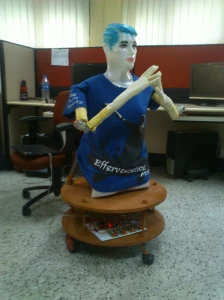
Below is the SMART in Greeting position
Developed By--
Jitendra Kumar Pal
M.Tech(robotics) IIITA
Jainendra Shukla
M.Tech(robotics) IIITA
Published Paper:
1. SMART - http://www.springerlink.com/
2. CLOUD Robotics - http://www.springerlink.com/
First paper is published on SMART (Social Mobile Advanced Robot Testbed) Robot, which contains detail description of architecture of SMART, total degree of freedom, algorithm used for real time navigation and algorithm used in real time obstacle detection and avoidance.
We envision that in near future, Humanoid Robots will enter in the household. They have capability to change the quality of life and advance the human civilizations further. For this thing to happen, humanoid robot researchers need to solve many challenging problems. Towards this we have taken a significant step in developing indigenously a low cost research test bed where researchers can develop and test many technologies for Human Robot interactions. The basic issue which has been addressed is the development of a cost effective platform which will be stable and robust, having an open architecture so that various technologies like speech, vision, intelligence can be integrated with physical gestures. First we have described the developmental architecture of the SMART, and then the application of SMART as an intelligent robot which, for the time being, is capable of demonstrating our robotics and artificial intelligence laboratory to the visitors as a lab guide in an interactive manner.
Below is the SMART in Greeting position

Developed By--
Jitendra Kumar Pal
M.Tech(robotics) IIITA
Jainendra Shukla
M.Tech(robotics) IIITA
Published Paper:
1. SMART - http://www.springerlink.com/
2. CLOUD Robotics - http://www.springerlink.com/
First paper is published on SMART (Social Mobile Advanced Robot Testbed) Robot, which contains detail description of architecture of SMART, total degree of freedom, algorithm used for real time navigation and algorithm used in real time obstacle detection and avoidance.
- SMART navigating autonomously in Robotics Lab of IIITA

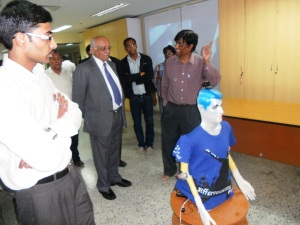
- SMART guiding audience autonomously in Lab with my professor G.C. Nandi

- Detail of implementation of speech in SMART
- For Speech of Robot we have used an online application TTS
- This online TTS application convert text to speech (English)
- Pronunciation of this application is very good, and it was meeting our requirement, so we have used this application
- Below is real time demo given by SMART in Robotics Lab at IIITA
- Below is real time demo by SMART and showing inner structure of SMART (Working of hand's motors)
- SMART, inspecting by our professor G.C.Nandi
- Manual control of SMART in early stage of develpoing by me [JP], SMART has two modes
- One is Autonomous mode in which it will act as a guide to greet any visitor and give demonstration of Robotics lab to the visitor autonomously
- Second mode is manual mode in which it can be controlled manually by human using system interface. SMART can be controlled by keyboard
- Very early stage of SMART development (Only Base): below is the demonstration of SMART when we have developed it's base, which contain only two geared motor for navigation. We have used car wiper motors which suites very well for our requirement
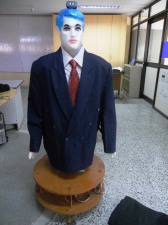
- SMART with new professional look (Complete Development): Below is the demonstration given by SMART in autonomous mode, this time cloths of SMART is provided by our very kind Sir Dr. Pavan Chakraborty
- Other small projects developed during M.Tech
- We have developed this robot for participating in IIT Kanpur techfest Techkriti 2012 in the event Lumos, and we have won 2nd prize. Below Robot Video shown is an autonomous robot which is able to avoid obstacle(in this case black color) so it will move only on the white color. We are using OpenCV for processing the Image in real time.
- Below is small robot capturing ball from the range of its vision, this is bird view arena so range is fixed. Camera is on the top which is fixed so robot has limited area to search for an object and capture it. This small concept can be implemented in many large industry where pic and place of heavy objects is required, without human intervention Robots can do his job autonomously. Video shown below is an autonomous robot which is able to capture a ball any where in its limited environment. Controlling of actuators has been done using parallelport and We are using OpenCV for processing the Image. It can capture the ball and will drop the ball on the defined check point.