Thursday, March 1, 2012


Wednesday, February 29, 2012
Configure GSL-1.8 with Dev-C++ in windows.
To download gsl-1.8 you can use this link.
The GNU Scientific Library (GSL) is a numerical library for C and C++ programmers. It is free software under the GNU General Public License.
The library provides a wide range of mathematical routines such as random number generators, special functions and least-squares fitting. There are over 1000 functions in total with an extensive test suite.
The complete range of subject areas covered by the library includes,


The GNU Scientific Library (GSL) is a numerical library for C and C++ programmers. It is free software under the GNU General Public License.
The library provides a wide range of mathematical routines such as random number generators, special functions and least-squares fitting. There are over 1000 functions in total with an extensive test suite.
The complete range of subject areas covered by the library includes,
| Complex Numbers | Roots of Polynomials |
| Special Functions | Vectors and Matrices |
| Permutations | Sorting |
| BLAS Support | Linear Algebra |
| Eigensystems | Fast Fourier Transforms |
| Quadrature | Random Numbers |
| Quasi-Random Sequences | Random Distributions |
| Statistics | Histograms |
| N-Tuples | Monte Carlo Integration |
| Simulated Annealing | Differential Equations |
| Interpolation | Numerical Differentiation |
| Chebyshev Approximation | Series Acceleration |
| Discrete Hankel Transforms | Root-Finding |
| Minimization | Least-Squares Fitting |
| Physical Constants | IEEE Floating-Point |
| Discrete Wavelet Transforms | Basis splines |
- You can download gsl-1.8 form here.
- After downloading install gsl.
- and do some changes in the Dev-C++ compiler.
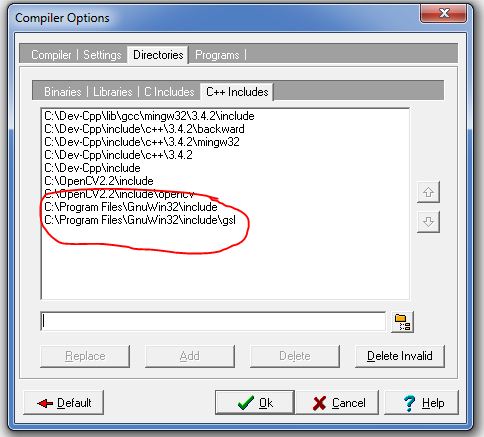
- go to Tools->Compiler options then follow these steps as shown in image below.
- add these commend to the linker
- -llibgsl -llibgslcblas
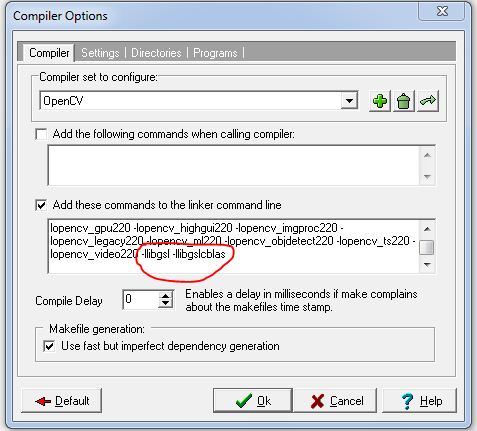
- Then go to directories and add followings directories of GSL as shown below
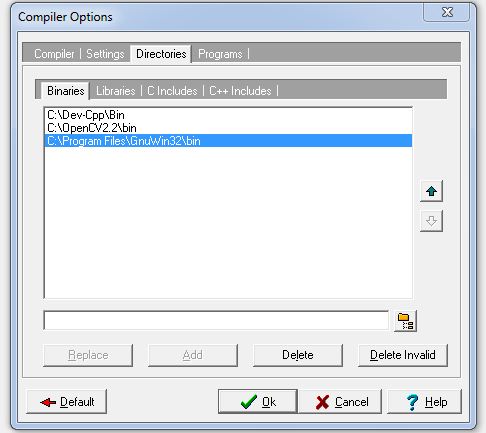
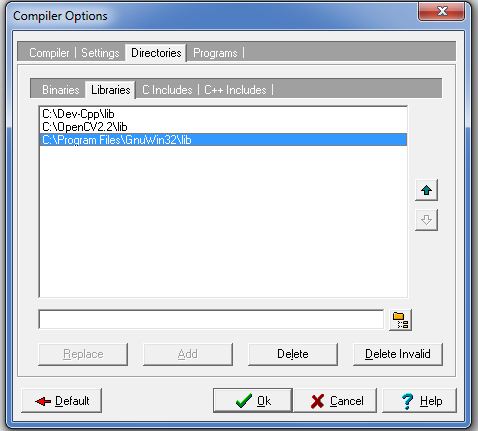
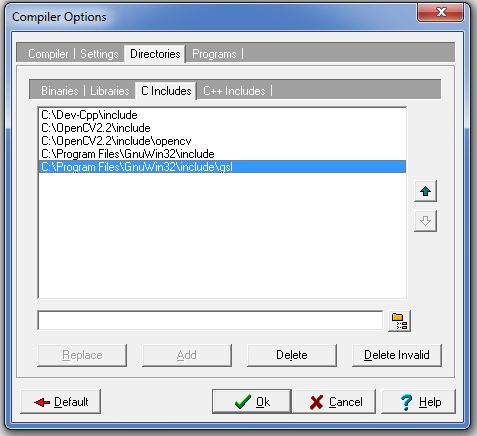
Wednesday, February 22, 2012
Hardisk data recovery tool for all windows operating system.
If accidentally you have deleted some files in your system, or at the time of installation you have deleted some partition of your hard disk, then you can use this tool for recovering your files.
http://www.cgsecurity.org/testdisk-6.13.win.zip
After downloading this software, first extract it where you you want to recover all your data, then run photorec_win.exe (In the extracted folder). then select the hard disk or some partition from that you want to recover your data.
It will work in
-Windows NT 4
- Windows 2000
- Windows XP
- Windows 2003
- Windows Vista
- Windows Server 2008
- Windows 7
ENJOY...
http://www.cgsecurity.org/testdisk-6.13.win.zip
After downloading this software, first extract it where you you want to recover all your data, then run photorec_win.exe (In the extracted folder). then select the hard disk or some partition from that you want to recover your data.
It will work in
-Windows NT 4
- Windows 2000
- Windows XP
- Windows 2003
- Windows Vista
- Windows Server 2008
- Windows 7
ENJOY...
Subscribe to:
Comments (Atom)